Bloom Filter in Go
Source:
- https://en.wikipedia.org/wiki/Bloom_filter
- https://redis.io/docs/latest/develop/data-types/probabilistic/bloom-filter/
- https://clickhouse.com/docs/en/engines/table-engines/mergetree-family/mergetree#table_engine-mergetree-data_skipping-indexes
What is Bloom filter?
When building high-performance systems, minimizing expensive operations like disk reads or remote database queries is critical.
A Bloom filter is a highly space-efficient, probabilistic data structure designed to test whether an element is a member of a set. It was conceived by Burton Howard Bloom in 1970.
Unlike standard data structures like hash tables or binary search trees that store the actual data, a Bloom filter only stores a cryptographic representation of the data. Because it does not store the raw elements, it requires a fraction of the memory.
The defining characteristic of a Bloom filter is its ironclad rule regarding accuracy:
- False Negatives are impossible: If the filter says an item is not present, it is 100% guaranteed to not be there.
- False Positives are possible: If the filter says an item is present, it means the item is probably there, but it could be a false alarm caused by overlapping data.
By placing a Bloom filter in front of a slow datastore, you can instantly filter out requests for missing items, saving massive amounts of latency and computational overhead.
The Core architect
To understand how it works, you need to understand its two primary components:
The Bit Array (m):
The filter begins as an array of m bits, all initially set to 0.The Hash Functions (k):
The filter uses k independent hash functions. When you feed data into a hash function, it outputs a seemingly random, uniform integer. In a Bloom filter, this output is mapped to an index position within the m-bit array.
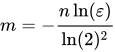
To initialize an optimal Bloom filter, we need two parameters based on our expected capacity (n) and acceptable false-positive probability (p):
- Size of the bit array (
m):
- Number of hash functions (
k):

Instead of actually running k separate hash functions (which is computationally expensive), we will use the Kirsch–Mitzenmacher optimization. We can hash the data once into a 64-bit integer, split it into two 32-bit integers (h₁ and h₂), and simulate k hash functions using the formula: hash_i = h_1 + i * h_2
How It Works: Step-by-Step
Adding an Element
When you want to add an item (for example, the string "user_123") to the Bloom filter:
- The item is passed through all k hash functions.
- Each hash function calculates a specific index position in the bit array.
- The bits at those specific indices are changed from 0 to 1.
- If a bit is already 1 from a previous insertion, it simply stays 1.
Let’s explore how this works with a concrete example. Imagine we created a Bloom filter of 3 bits and 2 hash functions and inserted the strings “Hello” and “Bloom” into the filter. If the hash functions match an incoming value with an index in the bit array, the Bloom filter will make sure the bit at that position in the array is 1.
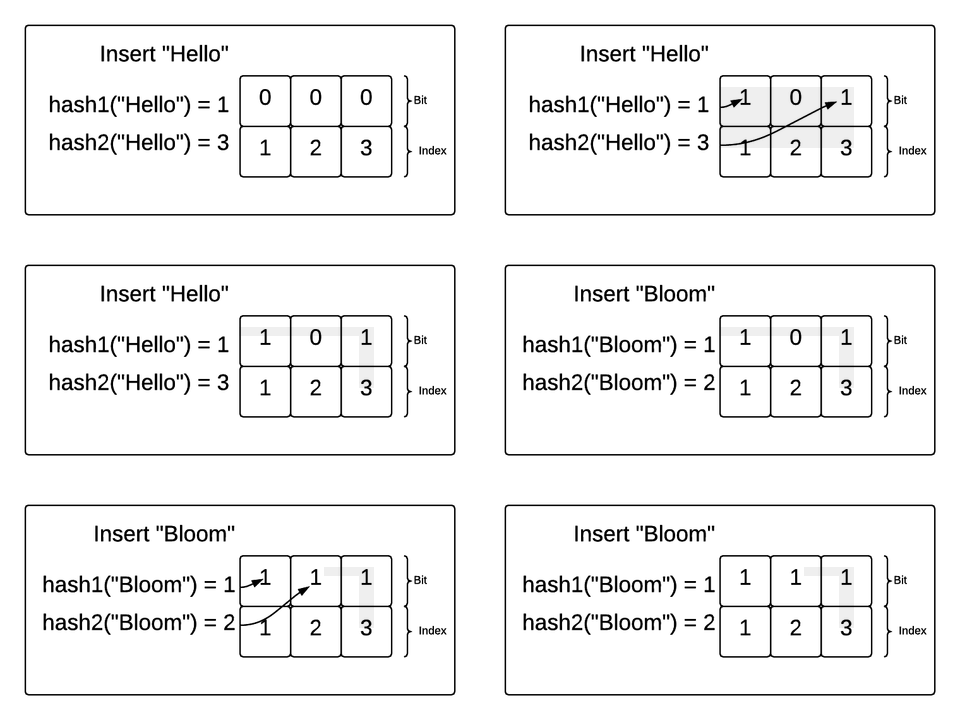
In this example, “Hello” was hashed to 1 by the first hash function and 3 by the second hash function. So, the Bloom filter made sure the bits at index 1 and 3 were flipped to 1. Then, “Bloom” was hashed to 1 and 2. The Bloom filter made sure those were both a 1 as well (even though position 1 already had a 1).
Checking for an Element (Lookup)
When you want to check if "user_123" is in the filter:
- The item is passed through the exact same k hash functions used during insertion.
- The filter checks the bits at the resulting indices.
- If any of the bits are 0:
The item has definitely never been added. If it had been added, all those bits would have been flipped to 1. The operation safely stops here. - If all of the bits are 1:
The item is probably in the set.
Why False Positives Happen
The reason an item is only probably in the set is due to hash collisions.
Imagine you add "Item A" and it flips bits at indices 2, 5, and 8.
Then you add "Item B" and it flips bits at indices 4, 11, and 15.
Now, you check for "Item C". By pure coincidence, the hash functions for "Item C" point to indices 2, 8, and 15. The filter checks those positions, sees they are all 1, and reports that "Item C" is present.
This is a false positive, caused by the overlapping bits of "Item A" and "Item B".
Use cases
Today, Bloom filters are widely used across many technologies including databases, networks, and distributed systems. They serve to reduce the need for expensive disk or network operations, thus improving performance. For example:
- Databases may use Bloom filters to avoid costly disk reads when searching for nonexistent keys.
- Web browsers utilize them to check URLs against a list of malicious websites.
- Web applications use them to determine whether a user ID is already taken.
- Recommendation engines use them to filter out previously shown posts.
- Spellcheckers use them to check words for misspellings and/or profanity.
The Implementation
mkdir bloom
cd bloom
go mod init bloom
touch bloom.go bloom_test.go
This implementation uses a sync.RWMutex to allow concurrent reads (Contains) while ensuring exclusive access during writes (Add). We use a []uint64 slice for maximum memory density.
package bloom

import (
    "hash/fnv"
    "math"
    "sync"
)

type BloomFilter struct {
    mu     sync.RWMutex
    bitset []uint64
    m      uint64
    k      uint64
}

func New(n uint64, p float64) *BloomFilter {
    mFloat := -(float64(n) * math.Log(p)) / (math.Pow(math.Log(2), 2))
    kFloat := (mFloat / float64(n)) * math.Log(2)

    m := uint64(math.Ceil(mFloat))
    k := uint64(math.Ceil(kFloat))
    if k < 1 {
        k = 1
    }

    return &BloomFilter{
        bitset: make([]uint64, (m+63)/64),
        m:      m,
        k:      k,
    }
}

func (bf *BloomFilter) getHashes(data []byte) (uint32, uint32) {
    h := fnv.New64a()
    h.Write(data)
    hash64 := h.Sum64()
    return uint32(hash64 & ((1<<32) - 1)), uint32(hash64 >> 32)
}

func (bf *BloomFilter) Add(data []byte) {
    h1, h2 := bf.getHashes(data)
    bf.mu.Lock()
    defer bf.mu.Unlock()

    for i := uint64(0); i < bf.k; i++ {
        idx := (uint64(h1) + i*uint64(h2)) % bf.m
        bf.bitset[idx/64] |= 1 << (idx % 64)
    }
}

func (bf *BloomFilter) Contains(data []byte) bool {
    h1, h2 := bf.getHashes(data)
    bf.mu.RLock()
    defer bf.mu.RUnlock()

    for i := uint64(0); i < bf.k; i++ {
        idx := (uint64(h1) + i*uint64(h2)) % bf.m
        if (bf.bitset[idx/64] & (1 << (idx % 64))) == 0 {
            return false
        }
    }
    return true
}
Benchmarking the Impact
To demonstrate the value of the filter, we simulate a slow system (like a database taking 50 microseconds to respond) and benchmark looking up an item that does not exist.
package bloom

import (
    "testing"
    "time"
)

func expensiveDatabaseLookup(key string) bool {
    time.Sleep(50 * time.Microsecond)
    return false
}

func BenchmarkWithoutBloomFilter(b *testing.B) {
    key := "missing-user-id"
    b.ResetTimer()
    for i := 0; i < b.N; i++ {
        _ = expensiveDatabaseLookup(key)
    }
}

func BenchmarkWithBloomFilter(b *testing.B) {
    bf := New(1_000_000, 0.01)
    key := []byte("missing-user-id")

    b.ResetTimer()
    for i := 0; i < b.N; i++ {
        // Fast path: Bloom filter checks first.
        if bf.Contains(key) {
            _ = expensiveDatabaseLookup(string(key))
        }
    }
}
The Results
Running go test -bench=. -benchtime=2s yields stark results:
- Without Bloom Filter: ~55,000 ns/op
- With Bloom Filter: ~60 ns/op
By verifying that the item is definitely not in the set, the Bloom filter intercepts the request in nanoseconds, completely bypassing the expensive 50-microsecond database penalty.