Architecture
This document provides a comprehensive technical architecture overview of ClickLens for developers and contributors.
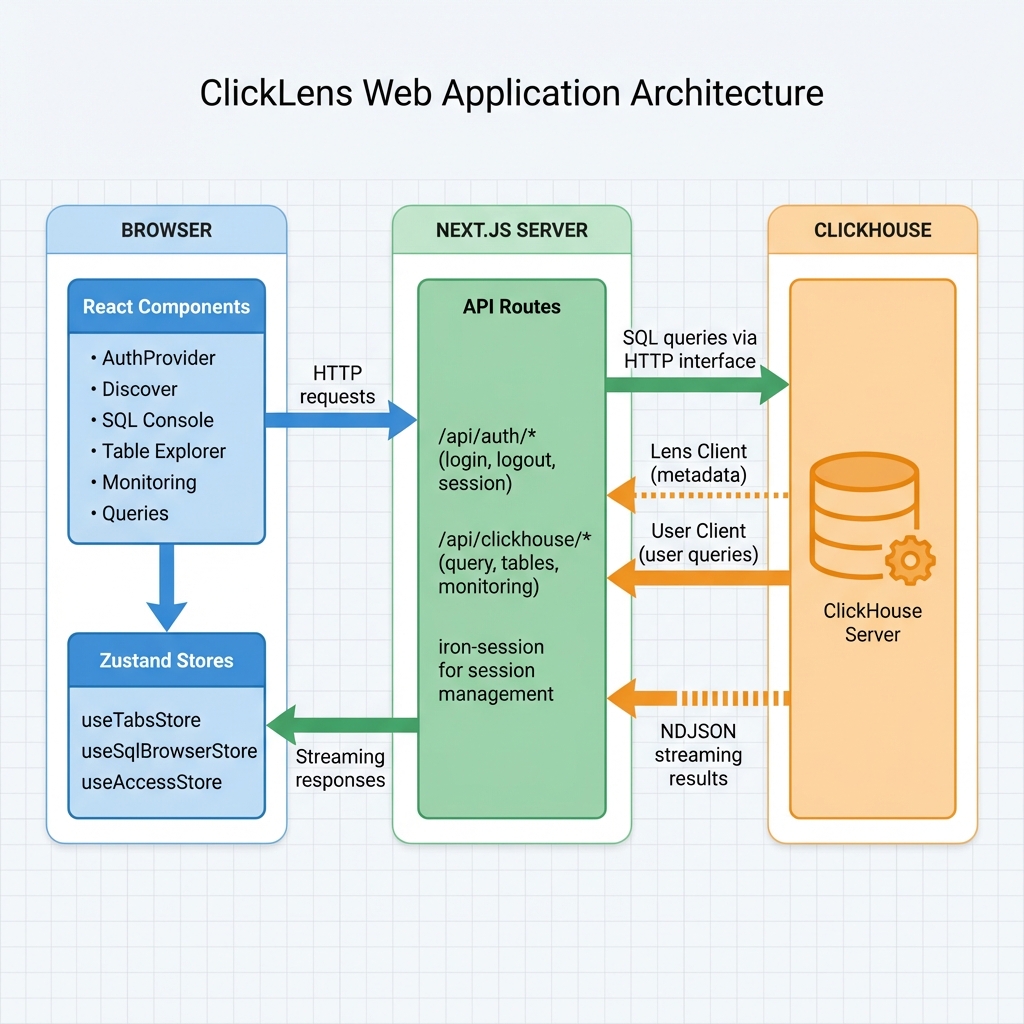
System Architecture Overview
ClickLens follows a layered architecture pattern with clear separation of concerns, enabling independent development and testing of each layer. The system is designed as a stateless web application that delegates all heavy lifting to ClickHouse while maintaining minimal server-side state.
Architecture Layers
-
Frontend Layer (
src/app/(app)/andsrc/components/): React Server and Client Components organized by feature module. State management via Zustand with selective localStorage persistence. -
API Layer (
src/app/api/): 41+ Next.js route handlers grouped by function (auth, clickhouse operations, access management). Handles authentication, permission checks, and ClickHouse query execution. -
Service Layer (
src/lib/): Core business logic including ClickHouse client management, RBAC derivation, monitoring queries, and SQL parsing utilities. -
External Layer: ClickHouse cluster accessed exclusively via HTTP interface. System tables provide metadata, monitoring data, and security information.
Key Architectural Decisions
- Dual Client Model: Separates privileged operations (via
LENS_USER/ per-clusterlensUser) from user-context queries (via session credentials) - Multi-Cluster Support: Each login session is pinned to one registered cluster; caches and metadata lookups are isolated by
config.clusterId - Permission Derivation: UI capabilities are computed from ClickHouse grants at login time, not stored separately
- NDJSON Streaming: Large query results stream incrementally to avoid memory exhaustion
- Server Components First: Next.js App Router with React Server Components for improved performance
Technology Stack
ClickLens leverages modern web technologies optimized for performance and developer productivity.
| Layer | Technology | Version | Purpose |
|---|---|---|---|
| Framework | Next.js (App Router) | 16.1.1 | Server-side rendering, API routes, file-based routing |
| Runtime | Bun (dev) / Node.js (prod) | 20.x | Fast development runtime, stable production runtime |
| UI Library | React | 19.2.3 | Component-based user interface |
| Styling | Tailwind CSS | 4.x | Utility-first CSS framework |
| ClickHouse Client | @clickhouse/client (HTTP) | 1.15.0 | Official ClickHouse JavaScript HTTP client |
| State Management | Zustand | 5.0.9 | Lightweight state management |
| Session | iron-session | 8.0.4 | Secure cookie-based sessions |
| Forms | React Hook Form + Zod | 7.x / 4.x | Form validation and management |
| Tables | TanStack React Table | 8.21.3 | Advanced data table component |
| Charts | Recharts | 3.6.0 | Data visualization |
| Editor | CodeMirror 6 | 6.x | SQL code editor with syntax highlighting |
| Caching | Redis | 6.x+ | Optional caching for improved performance |
Application Structure
The application follows Next.js App Router conventions with route groups for logical organization.
Directory Organization
src/
├── app/                    # Next.js App Router
│   ├── (app)/              # Authenticated route group (9 features)
│   │   ├── discover/       # Kibana-like data exploration
│   │   ├── sql/            # SQL Console with multi-tab support
│   │   ├── tables/         # Table Explorer with schema view
│   │   ├── monitoring/     # 8 monitoring sub-pages
│   │   ├── queries/        # Query analytics (4 views)
│   │   ├── logging/        # System logging (3 views)
│   │   ├── access/         # User and role management
│   │   ├── settings/       # Settings viewer
│   │   └── profile/        # User profile management
│   ├── api/                # API route handlers
│   │   ├── auth/           # Authentication (6 endpoints)
│   │   ├── clickhouse/     # ClickHouse operations (35+ endpoints)
│   │   └── saved-queries/  # Saved queries CRUD
│   └── login/              # Public login page
├── components/             # React components (80 files)
│   ├── auth/               # AuthProvider, useAuth hook
│   ├── discover/           # Discover feature components
│   ├── layout/             # Sidebar, Header, Shell
│   ├── logging/            # Log viewers and filters
│   ├── monitoring/         # Monitoring tabs and widgets
│   ├── queries/            # Query analytics components
│   ├── sql/                # SQL Console components
│   ├── tables/             # Table explorer components
│   └── ui/                 # shadcn/ui primitives (30 components)
└── lib/                    # Core business logic (31 files)
    ├── auth/               # Session management
    ├── clickhouse/         # ClickHouse client, config, **cluster registry**
    ├── hooks/              # Custom React hooks (6)
    ├── rbac/               # Feature roles and permissions
    ├── store/              # Zustand stores (3)
    ├── types/              # TypeScript definitions
    └── sql/                # SQL parsing utilities
Feature Module Summary
| Module | Route | Components | API Endpoints | Permission Required |
|---|---|---|---|---|
| Dashboard | / | Feature cards, hero section | N/A | Any authenticated user |
| Discover | /discover | QueryBar, FieldsSidebar, DiscoverGrid, DiscoverHistogram | /api/clickhouse/discover | canDiscover |
| SQL Console | /sql | SqlEditor (CodeMirror), ResultGrid (TanStack Table), QueryTabs, QueryHistory, SavedQueries | /api/clickhouse/query, /api/clickhouse/kill, /api/saved-queries/* | canExecuteQueries |
| Table Explorer | /tables | 8 tab components (overview, columns, parts, merges, mutations, replicas, dependencies, DDL) | /api/clickhouse/tables/explorer/* (7 endpoints) | canBrowseTables |
| Monitoring | /monitoring/* | 8 specialized dashboards | /api/clickhouse/monitoring/* (8 endpoints) | canViewCluster |
| Queries | /queries/* | 4 views (running, history, analytics, cache) | /api/clickhouse/queries/* (4 endpoints) | canViewProcesses |
| Logging | /logging/* | 3 log viewers | /api/clickhouse/logging/* (3 endpoints) | canViewServerLogs, canViewSessionLogs, canViewCrashLogs |
| Access | /access/* | User management, role management | /api/clickhouse/access/* (12 endpoints) | canManageUsers |
| Settings | /settings/* | Server settings viewer, session settings viewer | /api/clickhouse/settings/* (2 endpoints) | canViewSettings |
Core Architectural Patterns
Dual Client Model
ClickLens employs a sophisticated dual-client architecture that separates metadata operations from user queries, ensuring both security and performance.
Lens Client (Service Account)
- Credentials: From environment variables (
LENS_USER,LENS_PASSWORD) or per-clusterlensUser/lensPasswordinCLICKHOUSE_CLUSTERS - Purpose: Read-only metadata and monitoring operations that don't require user context
- Used By: Permission derivation, schema introspection, monitoring dashboards, cluster topology
- Required Grants:
SELECT ON system.*,SHOW DATABASES,SHOW TABLES,ACCESS MANAGEMENT(for reading grants) - Multi-Cluster: Each registered cluster has its own Lens credentials; the correct one is selected based on the session's
clusterId
User Client (Session Credentials)
- Credentials: From user session (encrypted in cookie)
- Purpose: Execute user-initiated queries with their actual ClickHouse permissions
- Used By: SQL Console, Discover, Table Explorer (for data preview)
- Permissions: Exactly what the user has in ClickHouse (SELECT, INSERT, CREATE, etc.)
- Audit Trail: Queries appear in
system.query_logwith the user's username
When Each Client is Used
| Operation | Client Type | Reason |
|---|---|---|
| Execute user SQL query | User Client | Enforce user's actual permissions, audit as user |
| Discover feature (data) | User Client | User must have SELECT on table |
| Derive permissions at login | Lens Client | Need to query system.grants for any user |
| Fetch database/table list | Lens Client | Consistent metadata regardless of user permissions |
| Monitoring dashboards | Lens Client | Need consistent system.* access for all users |
Query history from system.query_log | Lens Client | Users may not have SELECT on system tables |
| Kill running query | User Client | User must have KILL QUERY grant |
| User/role management | User Client | User must have ACCESS MANAGEMENT grant |
State Management Architecture
ClickLens uses Zustand for client-side state management, organized into three distinct stores with different persistence strategies.
useTabsStore (Persisted)
Purpose: Manage SQL Console tabs and query history
Persistence: localStorage (key: clicklens-tabs-storage)
State:
tabs: Array of query and table tabsactiveTabId: Currently active tabhistory: Last 100 query history entries
Persistence Strategy:
- Tabs are saved without
resultdata (too large for localStorage) - History entries include: SQL, duration, rows, bytes, memory, user, error
- Maximum 100 history entries retained (oldest pruned)
useSqlBrowserStore (Transient)
Purpose: Cache database/table metadata for SQL Console and Discover
Persistence: None (in-memory only)
State:
databases: List of available databasesselectedDatabase: Currently selected databasetables: Table informationtablesCache: Cached table lists per databasecolumnsCache: Cached column information with TTL
Caching Strategy:
- Tables are preloaded for all databases on mount
- Columns have a 5-minute TTL cache
- Cache keys use
database.tableformat
useAccessStore (Transient)
Purpose: Manage Access Control UI state (user/role editing)
Persistence: None (transient state)
State:
- Editing state for users and roles
- Form data for create/edit operations
Data Flow Architecture
Query Execution Pipeline (NDJSON Streaming)
ClickLens implements a streaming query execution model that efficiently handles large result sets without blocking the UI or consuming excessive memory.
Stream Events (NDJSON Format):
| Event Type | Description |
|---|---|
meta | Column names and types |
data | Batches of result rows |
progress | Rows read, bytes processed |
done | Query complete with final statistics |
error | Error details if query fails |
Client-Side Processing:
- Parse NDJSON lines as they arrive
- Throttle UI updates to every 200ms (performance optimization)
- Accumulate rows in component state
- Display progress while streaming
Query Cancellation Flow
Each query is assigned a UUID (query_id) which enables cancellation via ClickHouse's KILL QUERY command.
Authentication & Authorization Architecture
ClickLens implements a sophisticated permission derivation model that leverages ClickHouse's native RBAC system, eliminating the need for separate permission storage or synchronization.
Session Management
Session Library: iron-session
Configuration:
- Cookie Name:
clicklens-session - Encryption: AES-256-GCM via iron-session
- TTL: 24 hours
- Storage: Encrypted cookie (credentials never exposed to browser)
- Secret Key:
SESSION_SECRETenvironment variable (minimum 32 characters)
Session Data Structure:
interface SessionData {
  isLoggedIn: boolean;
  sessionId?: string;
  clusterId?: string; // Cluster ID from CLICKHOUSE_CLUSTERS registry
  user?: {
    username: string;
    password: string; // Encrypted in cookie
    host?: string;
    database?: string;
  };
}User credentials are encrypted server-side and stored in the session cookie.
They are never exposed to the client browser. The SESSION_SECRET
environment variable MUST be at least 32 characters for secure encryption.
Permission Derivation Model
Permissions are not stored in ClickLens—they are dynamically derived from ClickHouse grants at login time. This ensures permissions always reflect the current ClickHouse state without synchronization complexity.
Derivation Process:
- User logs in with ClickHouse credentials
- ClickLens queries
system.grantsfor user privileges (via Lens Client) - If no rows (XML-configured users), fall back to
SHOW GRANTS(via User Client) - Execute probe queries to verify access (e.g.,
SELECT 1 FROM system.processes LIMIT 1) - Map native ClickHouse grants to 13 UI permission flags
- Permissions are cached in client-side AuthContext
- UI components use
useAuth()hook to check permissions
Grant-to-Permission Mapping:
| ClickHouse Grant | UI Permission | Feature Enabled |
|---|---|---|
ACCESS MANAGEMENT | canManageUsers | User/Role Management |
SELECT ON system.processes | canViewProcesses | Query Monitoring |
KILL QUERY | canKillQueries | Query Termination |
SHOW TABLES | canBrowseTables | Table Explorer |
SELECT ON *.* | canExecuteQueries | SQL Console |
SHOW TABLES + SELECT | canDiscover | Discover Feature |
SELECT ON system.clusters | canViewCluster | Cluster Monitoring |
SELECT ON system.settings | canViewSettings | Settings Module |
SELECT ON system.text_log | canViewServerLogs | Server Logs Tab |
SELECT ON system.session_log | canViewSessionLogs | Session Logs Tab |
SELECT ON system.crash_log | canViewCrashLogs | Crash Logs Tab |
Feature Roles: ClickLens defines 6 predefined ClickHouse roles prefixed with clicklens_* that bundle common permission sets.
| Feature Role | Purpose | Required Grants |
|---|---|---|
clicklens_table_explorer | Browse schemas | SHOW DATABASES, SHOW TABLES, SELECT ON system.{tables,columns,parts,replicas,mutations,merges} |
clicklens_query_monitor | Monitor queries | KILL QUERY, SELECT ON system.{processes,query_log,query_cache} |
clicklens_cluster_monitor | Monitor cluster | SELECT ON system.{clusters,replicas,metrics,events,disks,replication_queue,asynchronous_metrics} |
clicklens_user_admin | Manage users/roles | ACCESS MANAGEMENT ON *.* |
clicklens_table_admin | DDL operations | TRUNCATE, OPTIMIZE ON *.* |
clicklens_settings_admin | View configuration | SELECT ON system.{settings,server_settings} |
XML-Configured Users (e.g., default user): Some users receive access via
users.xml instead of SQL grants. Since these privileges don't appear in
system.grants, ClickLens intelligently falls back to user-credential probes
(running SHOW GRANTS and probing system.tables with the user's
credentials) to accurately determine access.
Component Architecture
ClickLens follows a hierarchical component structure with clear separation between UI primitives and feature-specific components.
Component Hierarchy
App (Root)
├── AuthProvider (wraps entire app)
│   └── Provides authentication context
├── Layout (src/app/layout.tsx)
│   └── Global layout with providers
└── (app) Route Group
    ├── Shell Layout (src/app/(app)/layout.tsx)
    │   ├── Sidebar (navigation)
    │   ├── Header (top bar)
    │   └── Connection Status
    └── Feature Pages
        ├── Dashboard
        ├── Discover
        ├── SQL Console
        ├── Table Explorer
        ├── Monitoring (8 tabs)
        ├── Queries (4 views)
        ├── Logging (3 views)
        ├── Access (2 views)
        ├── Settings (2 views)
        └── Profile
Custom Hooks Architecture
The application uses six custom hooks to encapsulate complex logic and provide clean interfaces to components.
| Hook | File | Purpose |
|---|---|---|
useIncrementalData | use-incremental-data.ts | Polling with diff-based updates |
useLogs | use-logs.ts | Log fetching with filtering |
useMonitoring | use-monitoring.ts | Auto-refreshing monitoring data |
useQueryAnalytics | use-query-analytics.ts | Query performance aggregation |
useSettings | use-settings.ts | Settings management |
useTableExplorer | use-table-explorer.ts | Table browsing state |
API Architecture
ClickLens exposes 41+ API endpoints organized by functional area. All endpoints follow REST conventions and return JSON responses (except streaming query endpoint which returns NDJSON).
API Endpoint Groups
Authentication (/api/auth/):
/api/auth/login- Authenticate user, create session/api/auth/logout- Destroy session/api/auth/session- Get current session data/api/auth/permissions- Derive UI permissions from grants/api/auth/password- Change user password/api/auth/clusters- List available clusters (multi-cluster mode, public endpoint)
Query Execution (/api/clickhouse/):
/api/clickhouse/query- Execute SQL with NDJSON streaming/api/clickhouse/kill- Kill running query by query_id/api/clickhouse/ping- Health check
Schema & Metadata (/api/clickhouse/):
/api/clickhouse/databases- List databases/api/clickhouse/tables- List tables/api/clickhouse/schema/columns- Get column metadata for autocomplete/api/clickhouse/schema/table-columns- Get table columns with types
Table Explorer (/api/clickhouse/tables/explorer/):
/api/clickhouse/tables/explorer- Table list with engine info/api/clickhouse/tables/explorer/columns- Column definitions/api/clickhouse/tables/explorer/parts- Data parts/api/clickhouse/tables/explorer/merges- Active merges/api/clickhouse/tables/explorer/mutations- Pending mutations/api/clickhouse/tables/explorer/replicas- Replica status/api/clickhouse/tables/explorer/dependencies- Table dependency graph/api/clickhouse/tables/explorer/ddl- CREATE TABLE statement
Monitoring (/api/clickhouse/monitoring/):
/api/clickhouse/monitoring/overview- Dashboard metrics/api/clickhouse/monitoring/dashboard- Time-series charts/api/clickhouse/monitoring/metrics- Current metrics/api/clickhouse/monitoring/cluster- Cluster topology/api/clickhouse/monitoring/health- Health checks/api/clickhouse/monitoring/disks- Disk usage/api/clickhouse/monitoring/keeper- Keeper status/api/clickhouse/monitoring/operations- Merges/mutations
Query Analytics (/api/clickhouse/queries/):
/api/clickhouse/queries/running- Active queries (system.processes)/api/clickhouse/queries/history- Query log (system.query_log)/api/clickhouse/queries/analytics- Top resource-consuming queries/api/clickhouse/queries/cache- Query cache statistics
Access Management (/api/clickhouse/access/):
/api/clickhouse/access/users- List/create users/api/clickhouse/access/users/[id]- Update/delete user/api/clickhouse/access/roles- List/create roles/api/clickhouse/access/roles/[id]- Update/delete role
Discover Feature (/api/clickhouse/):
/api/clickhouse/discover- Data or histogram query
Logging (/api/clickhouse/logging/):
/api/clickhouse/logging/server- Server logs (system.text_log)/api/clickhouse/logging/session- Session logs (system.session_log)/api/clickhouse/logging/crash- Crash logs (system.crash_log)
Settings (/api/clickhouse/settings/):
/api/clickhouse/settings/server- Server settings (system.server_settings)/api/clickhouse/settings/session- Session settings (system.settings)
API Patterns and Conventions
Error Handling: All endpoints return { success: boolean, error?: string, data?: any } format. HTTP status codes: 200 (success), 401 (unauthorized), 403 (forbidden), 500 (server error).
Authentication: All /api/clickhouse/* endpoints check session via getSessionClickHouseConfig(). Returns 401 if not logged in.
Permission Checks: Endpoints that require specific permissions check them via the User Client (e.g., attempting KILL QUERY will fail if user lacks the grant).
Client Selection:
- User-initiated queries: User Client
- Metadata/monitoring: Lens Client
- Access management: User Client (requires
ACCESS MANAGEMENT)
Security Architecture
ClickLens implements defense-in-depth security through multiple layers.
Application Security
- Session Encryption: All session data encrypted with iron-session (AES-256-GCM)
- Permission Derivation: Direct mapping from ClickHouse grants, no permission storage
- Input Validation: Zod schemas for all API inputs
- Rate Limiting: Built-in rate limiting for authentication endpoints
- Security Headers: Next.js configured with strict security policies
Network Security
- HTTPS Support: Optional SSL/TLS for ClickHouse connections
- Cookie Security: Secure, HttpOnly cookies in production
- CSRF Protection: SameSite cookie policies and explicit Double-Submit Cookie token (
x-csrf-tokenheader) for state-mutating API routes - CORS Control: Configured API access policies
Error Handling Architecture
ClickLens implements centralized error handling through @/lib/errors to provide consistent, user-friendly error messages while maintaining security.
Error Categorization
All ClickHouse errors are categorized into specific types for appropriate handling and user feedback.
| Error Type | Description | User Experience |
|---|---|---|
| SYNTAX | Invalid SQL syntax, typos, malformed queries | Shows syntax error with line/column information and suggestion |
| SCHEMA | Table/database not found, column doesn't exist | Lists available tables/columns, suggests similar names |
| PERMISSION | User lacks required grants for operation | Explains required permission, suggests contacting admin |
| TIMEOUT | Query exceeded execution time limit | Shows timeout duration, suggests optimizing query |
| NETWORK | Connection issues, ClickHouse unreachable | Displays connection status, retry option |
| SYSTEM | ClickHouse internal errors, resource limits | Shows system error details, suggests checking cluster health |
Error Response Format
All API errors follow a consistent structure:
{
  success: false;
  error: {
    code: number;           // HTTP status or error code
    type: string;           // "SYNTAX", "SCHEMA", "PERMISSION", etc.
    message: string;        // Technical details (sanitized in production)
    userMessage: string;    // User-friendly explanation
    hint?: string;          // Optional actionable suggestion
  };
}
Security Considerations
- Production Sanitization: File paths, IP addresses, credentials, and stack traces are removed from error responses
- Server-Side Logging: Full error details logged server-side for debugging
- User-Friendly Messages: Technical errors translated to actionable guidance
- Hint System: Contextual suggestions help users resolve issues independently
Usage Pattern
import { formatQueryError } from "@/lib/errors";

try {
  const result = await clickHouseClient.query({ query: sql });
  return result;
} catch (error) {
  const formatted = formatQueryError(error, undefined, true);
  return NextResponse.json(
    { success: false, error: formatted },
    { status: 500 },
  );
}
Performance Optimizations
ClickLens incorporates several performance optimizations to ensure responsiveness even with large datasets.
- NDJSON Streaming: Incremental result rendering
- Column Caching: 5-minute TTL for schema information
- Throttled Updates: 200ms throttle during streaming
- Virtualization: Virtual scrolling for large tables
- Code Splitting: Automatic route-based code splitting
- Standalone Build: Optimized serverless deployment
- Query Timeout Enforcement: Prevents runaway queries (default 60s, max 300s)
- Metadata Caching: Table schemas and column information cached to reduce database load
Virtualized Components
ClickLens implements virtualized rendering for large datasets to maintain smooth performance even with millions of rows.
| Component | Location | Purpose | Key Features |
|---|---|---|---|
| VirtualizedResultGrid | src/components/sql/VirtualizedResultGrid.tsx | SQL Console query results | Windowed rendering, dynamic row heights, smooth scrolling, column resizing, row selection |
| VirtualizedDiscoverGrid | src/components/discover/VirtualizedDiscoverGrid.tsx | Discover feature data exploration | Same features as ResultGrid, optimized for time-series data with expandable rows |
Technical Implementation:
- Uses TanStack Table with virtualization plugin
- Renders only visible rows (typically 20-50) regardless of total dataset size
- Maintains scroll position and selection state efficiently
- Supports dynamic row heights for expandable content
- Implements column resizing with persisted preferences
Deployment Architecture
ClickLens is designed for containerized deployment with a multi-stage Docker build optimized for production environments.
Docker Build Stages
Build Optimizations:
- Multi-stage build for minimal image size
- Standalone output for optimal startup
- Runtime environment variables
- Session secret provided at runtime (not build time)
Environment Configuration
The application requires minimal configuration through environment variables:
Required:
CLICKHOUSE_CLUSTERS- JSON array of cluster definitions. Each entry requiresid,label,host,lensUser,lensPassword. One entry = single cluster, more = multi-cluster.SESSION_SECRET- Session encryption key (min 32 chars)
Deprecated (migrate to CLICKHOUSE_CLUSTERS above):
CLICKHOUSE_HOST- ClickHouse server address (migrate tohostinCLICKHOUSE_CLUSTERS)CLICKHOUSE_PORT- Default:8123(migrate toportper registry entry)CLICKHOUSE_SECURE- Default:false(migrate tosecureper registry entry)CLICKHOUSE_VERIFY- Default:true(migrate toverifySslper registry entry)LENS_USER- Service account username (migrate tolensUserinCLICKHOUSE_CLUSTERS)LENS_PASSWORD- Service account password (migrate tolensPasswordinCLICKHOUSE_CLUSTERS)
Optional:
NODE_ENV- Default:developmentDISABLE_SECURE_COOKIES- Default:falseREDIS_URL- Redis connection URL for caching (e.g.,redis://localhost:6379)
Caching Architecture
ClickLens supports optional Redis caching to improve performance for frequently accessed data.
Redis Integration
Purpose: Cache query results and monitoring metrics to reduce ClickHouse load and improve response times.
Cached Data Types:
- Table Explorer data (schema information, parts, merges, mutations)
- Monitoring metrics (system.metrics, system.asynchronous_metrics)
- Query analytics data
- Time-series chart data
Cache Strategy: Stale-while-revalidate pattern
- Serve cached data immediately
- Refresh cache in background
- Reduces perceived latency for users
Configuration:
- Redis is optional - if
REDIS_URLis not set, caching is disabled - Connection string format:
redis://[password@]host:port[/db] - Example:
redis://localhost:6379orredis://:password@redis.example.com:6379/0
Cache Key Patterns:
| Data Type | Key Pattern | TTL |
|---|---|---|
| Table schema | clicklens:schema:{clusterId}:{database}:{table} | 5 minutes |
| Table parts | clicklens:parts:{clusterId}:{database}:{table} | 1 minute |
| Monitoring metrics | clicklens:metrics:{clusterId}:{metric_name} | 30 seconds |
| Query analytics | clicklens:analytics:{clusterId}:{time_range} | 1 minute |
| Time-series data | clicklens:timeseries:{clusterId}:{metric}:{start}:{end} | 2 minutes |
All cache keys include {clusterId} to isolate data between clusters when multi-cluster mode is active. Falls back to "legacy" for single-cluster deploys.
Cache Invalidation Strategies:
| Strategy | Description | Use Case |
|---|---|---|
| TTL-based | Automatic expiration after configured time-to-live | Most monitoring data, schema information |
| Event-driven | Invalidate on specific events (e.g., table DDL) | Table Explorer data after schema changes |
| Pattern-based | Bulk invalidation using key patterns | Clear all monitoring data on cluster restart |
| Selective | Manual invalidation via API endpoints | Force refresh after data updates |
Benefits:
- Reduced ClickHouse query load
- Faster page loads for monitoring dashboards
- Better user experience with instant data display
- Lower resource consumption on ClickHouse server
Redis caching is completely optional. ClickLens functions normally without Redis, but enabling it significantly improves performance for monitoring and table browsing features.
ClickHouse Requirements
Minimum Version: 21.8+
Required Server Configuration (config.xml):
- HTTP interface enabled (port 8123 or 8443)
- Access management improvements enabled
Optional System Tables (enable in config.xml):
system.text_log- Server logs viewersystem.session_log- Session logs viewersystem.metric_log- Time-series monitoring charts
Lens Service Account Setup (defined via lensUser/lensPassword in CLICKHOUSE_CLUSTERS, or the deprecated LENS_USER/LENS_PASSWORD env vars):
- Grant
SELECT ON system.* - Grant
SHOW DATABASES,SHOW TABLES,SHOW COLUMNS - Grant
ACCESS MANAGEMENT(for reading grants)